
About the Counterparty Summary
The Counterparty Summary page in Kooltra provides an overview of all of the key account information held in the system, including:
-
Cash balance information
-
Margin Summary
-
Open Trades, Orders and positions
-
P&L and Trading limits
-
Contact information
Accessing the Counterparty Summary Page
The Counterparty Summary page is launched as a pop-up window and can be accessed directly throughout Kooltra by either:
-
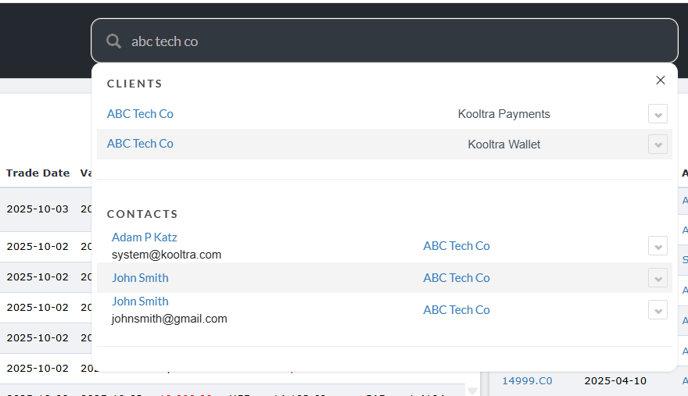
Searching for the account name in the search bar at the very top of the page
-
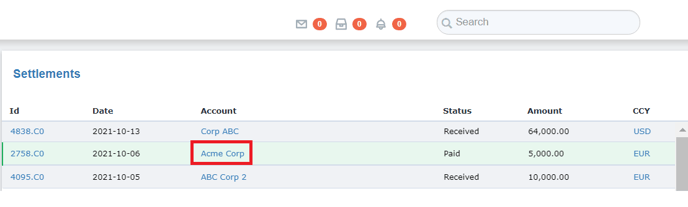
Clicking on the account name from within trade and settlement blotters
From search bar:
From a settlement blotter:
Counterparty Summary Overview
When the Counterparty Summary page launches it will load the Overview tab, which shows:
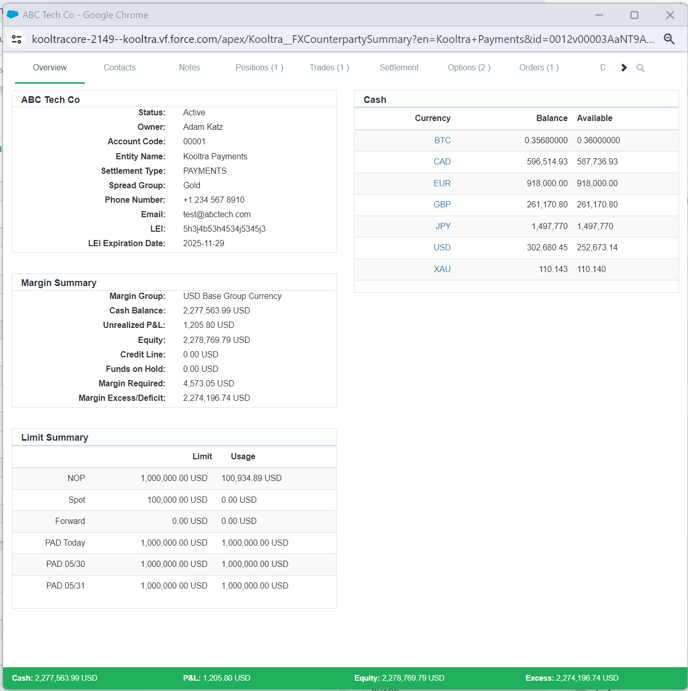
Client Details
-
Status - the current status of the client account
-
Broker - the name of the broker associated with the client (if applicable)
-
Account Code - the internal code used to identify the account
-
Entity Name - the entity within Kooltra that the client is assigned to
-
Settlement Type - method of settlement used by the client (typically either PAYMENTS for gross settlement clients, VOSTRO for net settlement clients, or NOSTRO for internal accounts and liquidity providers)
-
Phone Number - the phone number of the account’s primary contact
-
Email - email address of the accounts primary contact
- LEI: their Legal Entity Identified (if applicable)
- LEI Expiration Date: when the account's LEI will need to be updated (if applicable)
Margin Summary
-
Margin Group - the margin group the account is assigned to (if applicable)
-
Cash Balance - the net amount of all cash balances held on the account, converted to your base currency
-
Unrealized P&L - unrealized profit or loss calculated from the mark-to-market valuations of all open positions, converted to your base currency
-
Equity - represents the liquidation value of the account in base currency, calculated as Cash + Unrealized P&L
-
Credit Line - any credit that has been provisioned on the account, typically used to supplement initial or variation margining, or facilitate settlements for high value customers. Any Credit Line assigned to an account directly increases/decreases margin excess/deficit
-
Funds on Hold - cash on client accounts that is being held back and cannot be used against margin requirements or deal funding
-
Margin Required - amount of Margin the counterparty is expected to post, calculated based on their assigned Margin Group. Margin Required is recalculated whenever Positions, Cash Balances, or Rates change.
-
Margin Excess / Deficit - equal to Equity + Credit Line - Funds on Hold - Margin Required
Limit Summary
-
NOP Limit - details the Net Open Position Limit assigned to the account
-
NOP - shows, in base currency terms, the account’s total exposure across all open positions alongside any NOP Limit that has been configured.
-
PAD Limit - any limit to PAD (Pre-Authorized Debit) assigned to the account
-
PAD Available - equal to PAD Limit - PAD utilized
Cash
Details the cash balances in each of the client currency accounts, and the amount available to be used (as determined by the Funds Available configuration).
Contacts
The Contacts tab of the Counterparty Summary page provides high-level information relating to contacts at the client including:
-
Name
-
Email address
-
Phone number
-
Level of authorization
Notes
The Notes tab of the Counterparty Summary page shows any internal comments added to the account.
Positions
The Positions tab of the Counterparty Summary page shows all open positions associated with the Account, grouped by currency pair. For each open position the table details:
-
Currency Pair
-
Aggregate notional amounts in each currency
-
Average Rate across the trades contributing to the position
-
Current spot rate for the currency pair
-
Unrealized profit / loss on the position
Trades
The Trades tab of the Client Summary page lists all open trades under the account. For each open trade the page will show:
-
The Trade ID (Trade Name in Salesforce reports)
-
Trade Date
-
Value Date
-
Currency 1 and associated amount
-
Currency 2 and associated amount
-
Rate
Settlement
The Settlement tab of the Counterparty Summary page shows the net amounts due to be settled by the client over the next 3 days, in each currency traded.
Options
The Options tab of the Counterparty Summary page lists all open Options under the account. For each open Option the page will show:
-
The Trade ID (Trade Name in Salesforce reports)
-
Expiry Date
-
Action (Buy / Sell)
-
Strategy (Call / Put)
-
Notional amount
-
Currency pair
-
Strike price
-
Type
-
Trade Date
-
Premium
-
Premium Currency
Orders
The Orders tab of the Counterparty Summary page details any open orders booked under the account. For each open order the page will show:
-
Order ID
-
Order Type
-
Action (Buy / Sell)
-
Notional amount and currency
-
Currency pair
-
Rate
-
Hedge Rate
-
Provider
-
Good Till (if applicable)
Data
The Data tab of the Counterparty Summary page provides links to view more information relating to the client’s trades, options, orders, cashflows, vostros and documents.