
Bank Accounts
The Bank Accounts page in Kooltra displays all available bank accounts for the entity you are accessing. To open this page, click Settlements > Bank Accounts in the navigation pane.
By default, only bank accounts are shown in the Bank Accounts card. If you want to include liquidity providers and margin accounts, toggle the See All switch.
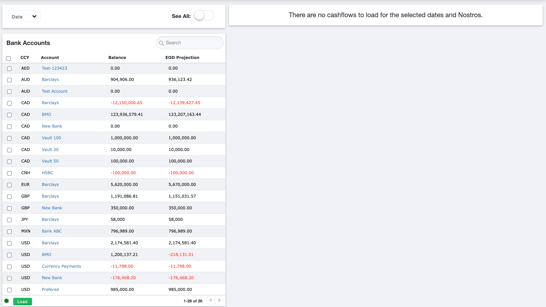
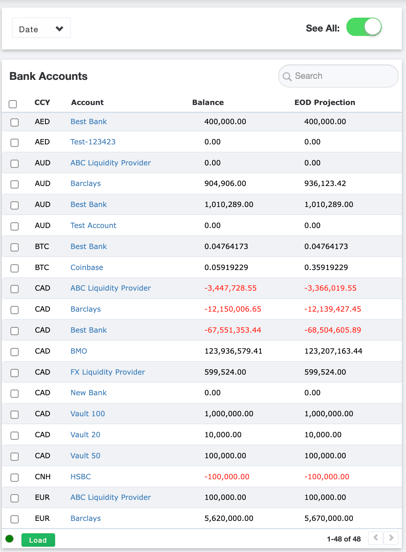
Viewing Cashflows
To view cashflows for all bank accounts, select the checkbox beside the CCY header to select all accounts. Click Load to show all cashflows for the selected accounts. The loaded cashflows will appear on the right-hand side of the page.
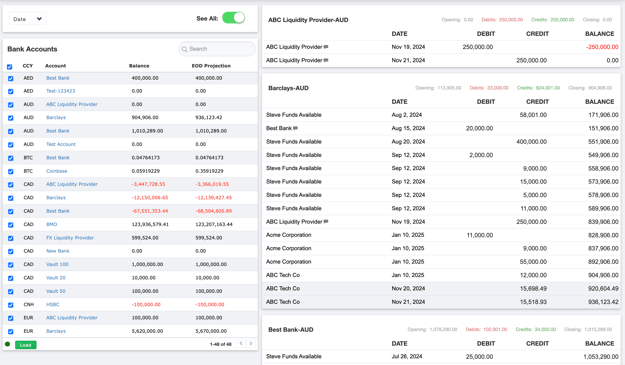
To view cashflows for bank accounts, start by selecting all accounts by checking the box beside the CCY header. Then click Load to display the cashflows for the selected accounts, which will appear on the right-hand side of the page.
The loaded cashflows are filtered by the date specified in the Date filter, located to the left of the toggle switch. To adjust the date range and display a different set of cashflows, click the Date filter, specify the desired range, and then click Load again to refresh the results.
You can also use the local search bar within the Bank Accounts card to search any column, such as CCY, Account Balance, or EOD Projection, making it easy to locate specific information.