Create a Liquidity Provider in Kooltra
Creating LP accounts in Kooltra follows the same mechanism as creating client accounts, with the exception of the Settlement Type, which is always set to ‘NOSTRO’ for LPs. Follow the steps below to create an LP in Kooltra:
-
Go to Counterparties > Counterparties in the navigation panel
-
Click Create New Counterparty button

- In the New Counterparty pop-up, populate all fields and set Settlement Type = NOSTRO then click Create.
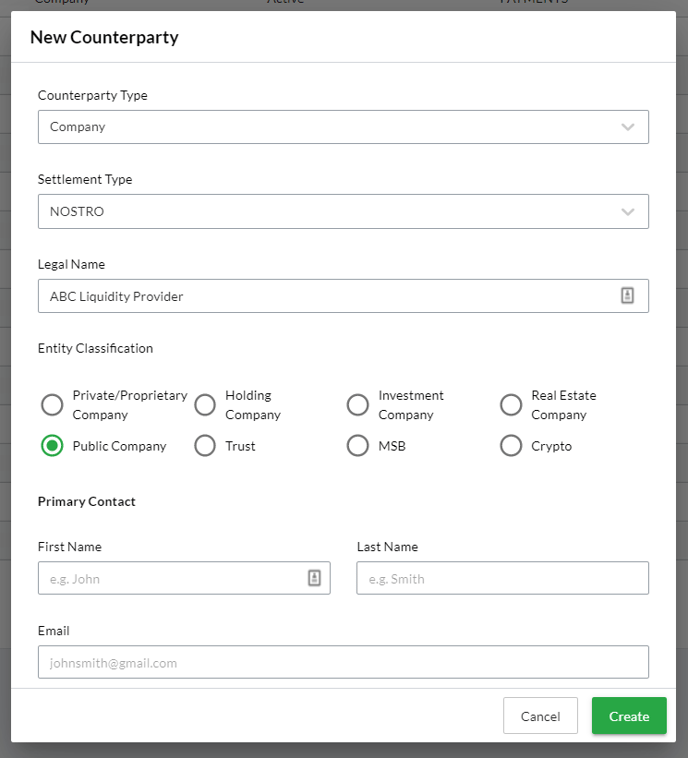
Note: immediately after clicking ‘Create’ the system will ask whether you wish to complete the counterparty onboarding form. Since these are not relevant for Liquidity Provider accounts, click ‘Skip for now’ and proceed to Configuring a Liquidity Provider in Kooltra below.
Configuring a Liquidity Provider in Kooltra
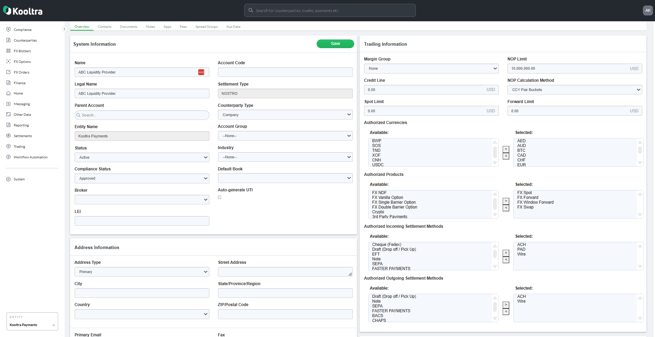
Following creation of the Liquidity Provider it will need to be configured for use. If at any time you wish to update the details associated with an LP, you can do so by going to Counterparties > Counterparties and searching for the LP in question.
Key information to be populated:
-
Account Code - unique code for the LP
-
Status - will need to be set to Active for the LP to be available for use within Kooltra
-
Margin Group - if you have any default margin groups configured, the created account will adopt this margin group. In the case of LPs, you will likely want to update this to ‘None’
-
Authorized Currencies - currencies available to trade with the LP
-
Authorized Products - products available to trade with the LP
- Authorized Incoming Settlement Methods - payment methods by which the LP can send funds to you
- Authorized Outgoing Settlement Methods - payment methods by which you can send funds to the LP
-
Address Information