
How do I add a Nostro account?
Manual Nostro Creation
Nostro accounts can be added to Kooltra by going to Settlements -> New Bank Account in the navigation panel. From here, users must define:
- The Entity the Nostro will be available under
- The type of Nostro (either Bank, Liquidity Provider or Margin Account)
- The Nostro Group
- The Nostro Name (Account Name)
- The Nostro Currency
Clicking Create will add the new Nostro and direct the user to the Nostro Account Information page to populate the full details: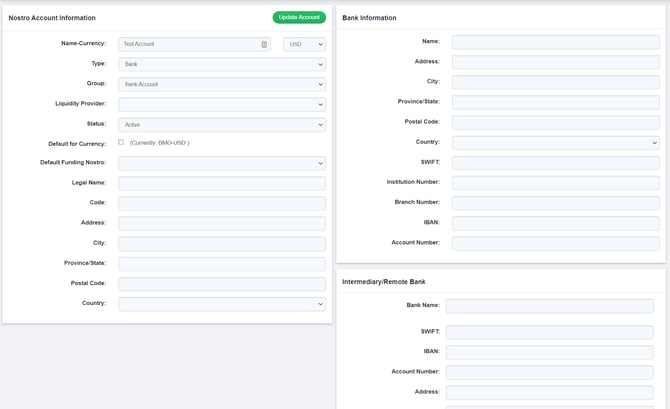
After making any changes to this page, click 'Update Account' to save the updates.
Automated Nostro Creation
Kooltra automatically creates Nostro accounts for counterparties whose settlement type is set to Nostro. When a trade is booked with one of these counterparties, the system checks if the required Nostro accounts for the currencies involved in the trade already exist. If they do not exist, Kooltra will automatically create the necessary Nostro accounts for those currencies.
How do I add a Vostro account?
Vostro accounts do not need to be manually created, as Kooltra will automatically generate a Vostro account when required by the system. For example:
- If a trade is executed and no settlement instructions are provided by the value date, the system will automatically create a Vostro account for the traded currency if one does not already exist.
In such cases, trades and cashflows can be created without specifying beneficiaries, and they will still settle to the appropriate Vostro account.
Please note: A counterparty can have only one Vostro account per currency.
To view and manage your Vostro accounts, go to Other Data > Vostros in the navigation pane. For more detailed information on Vostro accounts, refer to the article: Understanding Nostros and Vostros.