The daily positions blotter displays the positions of all trades corresponding to the value date selected in the Date filter. These positions are grouped by account, with the overall position for each currency shown at the bottom of the card.
To access the Daily Position Blotter click on FX Blotters > Daily Position Blotter in the navigation pane. The date shown in the daily position blotter can be changed by changing the Date filter and clicking Load. You can also filter trades based on their cashflow status, allowing you to view either Completed (settled) cashflows or Pending (open but not yet settled) cashflows. Additionally, you can filter trades by type, such as spot/forward or option premiums, and search for specific accounts as needed.
Kooltra also offers users the ability to export the information on the daily position blotter by clicking the Export to CSV button in the top right corner.

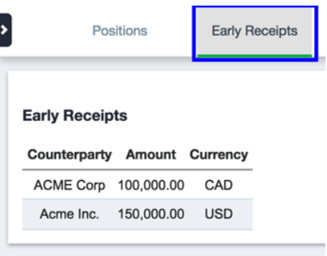
Early Receipts
The daily position blotter also provides users with information about early receipts, or cashflows that were settled ahead of their value date. To view early receipts, click on the Early Receipts tab located in the top menu. The early receipts card displays information about amount and currency that was received from a specific counterparty.