Do I need my own Salesforce instance to use Kooltra?
No, you do not. Kooltra is deployed with all of the Salesforce functionality that is needed for the platform to function, and the costs of this Salesforce functionality are included in your Kooltra subscription.
What Salesforce features come with Kooltra?
Kooltra is deployed with a subset of the features available to Salesforce CRM customers. This includes:
- Standard objects and fields for capturing Accounts and Contacts
- Custom objects and fields for capturing trade, payment, bank and beneficiary information
- Flows
- Report and Dashboard builders
Kooltra does not provide access to Salesforce CRM features, such as:
- Cases
- Leads
- Opportunities
If you want to use Salesforce as your CRM, you will need to purchase CRM licenses directly from Salesforce.
How do I access Kooltra's Salesforce backend?
You can directly access Kooltra's Salesforce backend by logging in through login.salesforce.com.
If you are already in Kooltra, you can navigate to the Salesforce backend by going to Reporting > Custom Reports from the navigation panel.
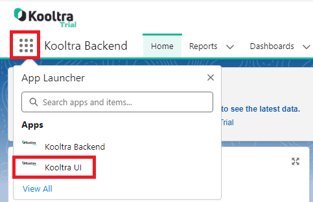
How do I get to Kooltra from Salesforce?
If you are in Kooltra's Salesforce backend, you can return to the Kooltra application by following the steps below:
- Click on the App Menu in the top-left of the screen
- Click 'Kooltra UI' from the drop-down that loads