
Enabling the Bulk FX Statement App
To enable the Bulk FX statements functionality in Kooltra, this can be managed through the Entity Settings.
Start by navigating to x-System > Entity Settings in the navigation panel on the left side of the screen. Once on the Entity Settings page, locate the Apps tab at the top of the page, next to Cashflows and Fee Groups. Within the Apps section, find the Bulk FX Statements app.

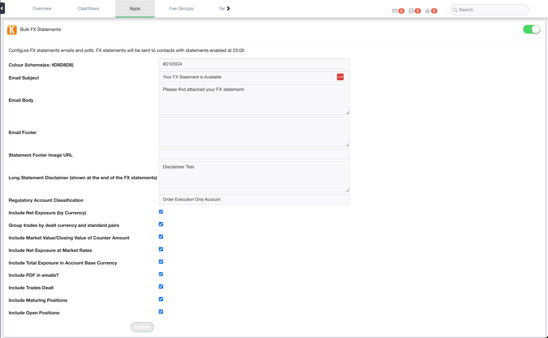
To enable the functionality, click on the toggle next to Bulk FX Statements. This will allow you to customize various aspects of the statement and email:
- Colour Scheme: Define the border colours in the FX statement using HEX code.
- Email Subject: Define the subject line of the email.
- Email Body: Specify the body text of the email.
- Email Footer: Specify the footer text in the email.
- Statement Footer Image URL: Add a URL to link a footer image.
- Long Statement Disclaimer: Add a disclaimer to the last page of the FX statement. This field supports HTML markup to meet IIROC requirements.
- Regulatory Account Classification: Specify regulatory classifications to be displayed on the first page of the disclaimer, as required by IIROC.
- Include Net Exposure (by Currency): Enables the inclusion of a net exposure section, which is an IIROC requirement.
- Group trades by dealt currency and standard pairs: Enables the inclusion of the FX Trade - Open and Maturing Positions tables grouped by Market Value/Closing Value CCY or not. This is an IIROC requirement. If this feature is disabled, trades will be grouped by CCY Pair and Value Date and not care about Dealt Currency
- Include Market Value/Closing Value of Counter Amount: Enables the inclusion of Market Value CCY/Closing Value CCY, Market Rate/Closing Rate, and Market Value/Closing Value in Open and Maturing Positions tables. This is an IIROC requirement.
- Include Net Exposure at Market Rates: Enables the inclusion of the Net Exposure at Market Rate column in the Net Exposure (by Currency) table.
- Include Total Exposure in Account Base Currency: Enables the inclusion of the Total Exposure in the account's base currency in the Net Exposure (by Currency) table.
- Include PDF in emails?: Enables PDFs to be included in the statement email.
- Include Trades Dealt: Enables the inclusion of trades dealt during the specified period.
- Include Maturing Positions: Enables the inclusion of a table for maturing trades.
- Include Open Positions: Enables the inclusion of a table for open trades.
For more information on generating FX statements, check out the article: Understanding Statements.