To access the Settlements Processor, click on Settlements -> Settlements Processor in the navigation pane.
This screen provides two cards to help you manage and settle your trades - the Daily Position card and the Pending Settlements card.
Daily Position Card
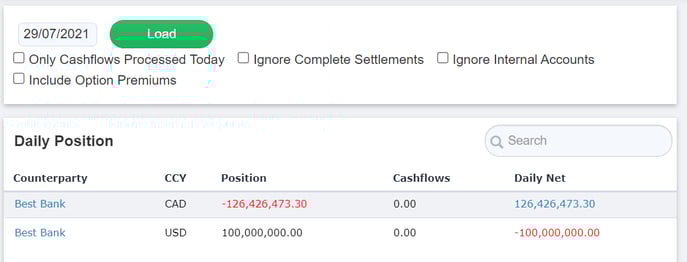
The Daily Position card shows a list of net settlements due on a given day.
To see settlements due for a specific date, update the date filter at the top of the page and click Load.
Net settlement amounts will then appear grouped by Counterparty and by Currency (CCY). There is a local search bar in the top right corner of the Daily Positions card that allows you to search for a specific Counterparty or Currency.
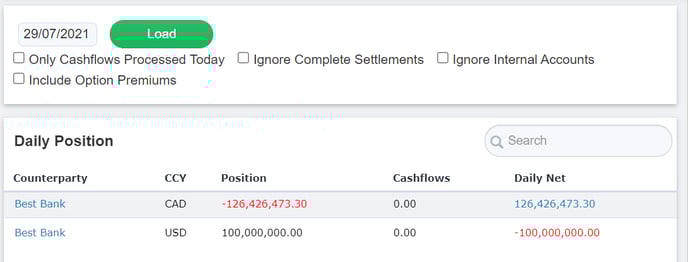
For each net settlement amount, the Daily Position card shows:
- Position - the total amount of money that is owed to (if negative), or due from (if positive), the counterparty in that currency on the date specified
-
Cashflows - the sum of settled cashflows in Kooltra for the corresponding counterparty and currency on the date specified
- Daily Net - The total amount that is yet to be settled. This is equal to Cashflows minus Position
At the end of the day, the Daily Net figure should show as 0 for all Counterparties, indicating that cashflows have been processed for all of the day's settlements.
If a non-zero Daily Net amount is shown, then Pending Settlements need to be created in Kooltra.
Creating a Pending Settlement
To create a Pending Settlement Cashflow from the Settlement Processor:
-
Click on the Daily Net amount in one of the rows of the Daily Position card
-
On the page that loads, ensure all details are correct. You can update any of the settlement information here such as the settlement method to be used or any fees that should be applied.
- Decide whether you would like to mark the settlement as already processed (i.e. payment has already been made / received) or pending (i.e. payment has not yet been made / received)
- If you would like to immediately mark the settlement as processed, check the Process Immediately box at the bottom of the page, just above the Insert Adjustment button.
- If you would like to process the settlement later, leave the Process Immediately box unchecked.
-
Click Insert Adjustment
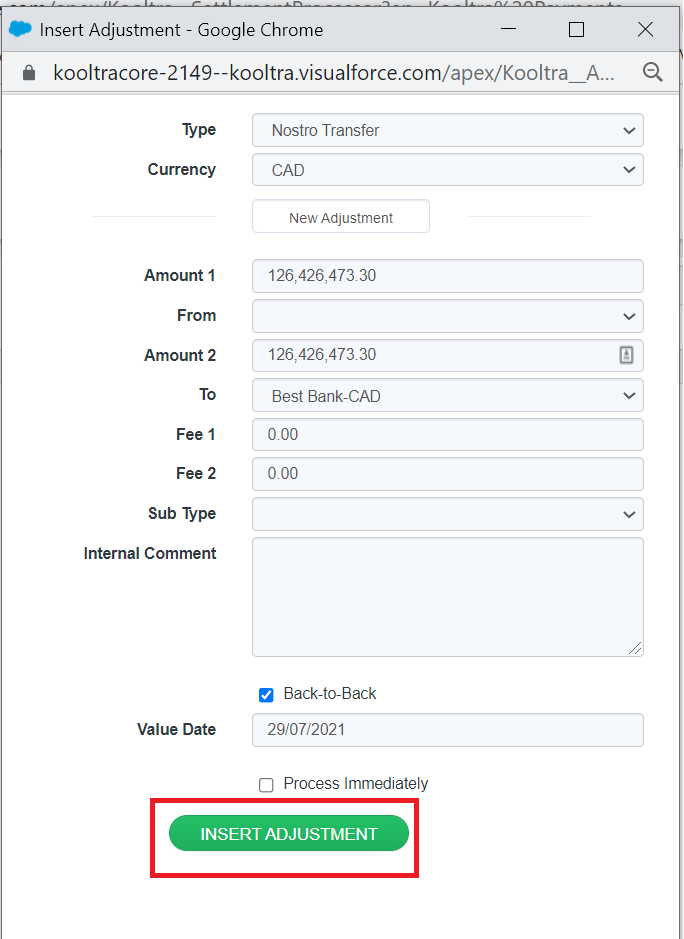
If you followed step 3(a) above, then the entered amount will immediately reflect under Cashflows in the Daily Position card.
If you followed step 3(b) above, then the entered amount will appear on the right-hand side of the Settlement Processor page, under the Pending Settlement.
Pending Settlements Card
The Pending Settlements card lists settlements (cashflows) that are expected to be completed, but have not yet been processed.
For each settlement the associated Counterparty, Currency (CCY), Amount, Value Date, Nostro and Beneficiary are listed.
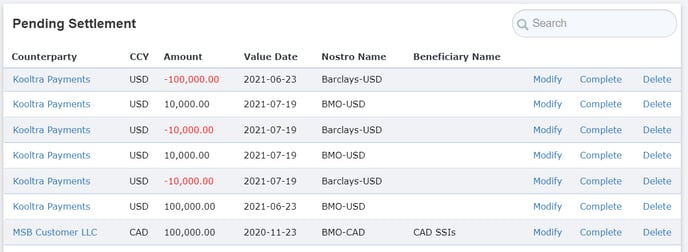
For each settlement listed there are three options available, each accessed via the corresponding button on the right of the screen:
-
Modify - click this button to amend the settlement details. This will load the Cashflow ticket, from which you can make the necessary updates and then click Modify.
-
Complete - click this button to process the settlement. This will load the Cashflow ticket, from which you can click Process Immediately to mark the settlement as completed (i.e. the payment has been made / received). The Daily Net and Cashflows amounts in the Daily Position card will update accordingly.
-
Delete - click this button to cancel the settlement and remove it from the Pending Settlements card
Filters
The filters available on the Settlements Processor page are:
-
Date - Sets the value date of trades that you would like to settle. By default, this date is set to today.
-
Only Cashflows Processed Today - only displays cashflows that were created on the date the page was loaded
-
Ignore Complete Settlements - filters the page to remove any settlements due that have already been completed (Daily Net is 0.00)
-
Ignore Internal Accounts - filters the page to remove any settlements associated with accounts of type ‘Internal’
-
Include Option Premiums - includes cashflows related to the premium paid / received for FX Options