
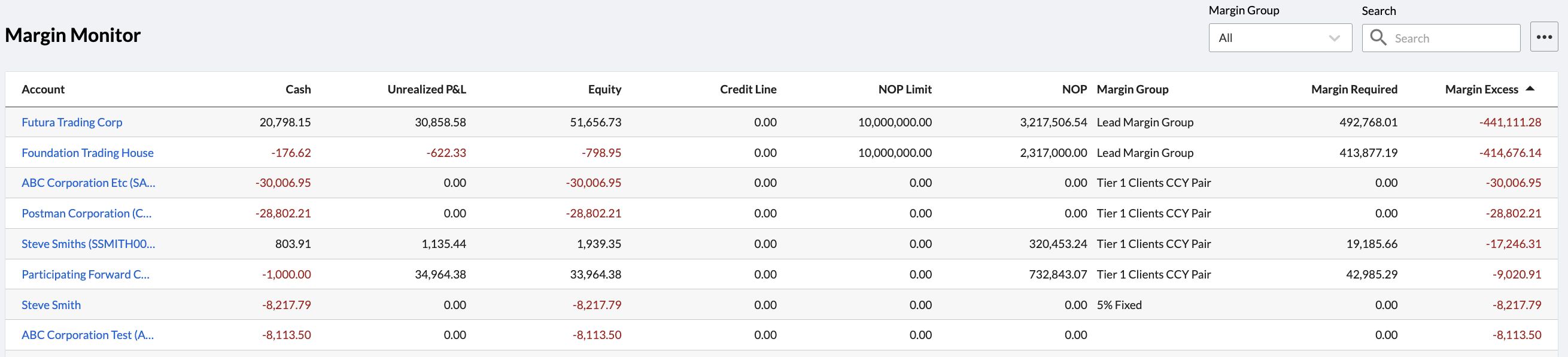
To access the Margin Monitor, go to FX Blotters > Margin Monitor in the navigation panel.
-
Cash - the net amount of all cash balances held on the account, converted to your base currency
-
Unrealized P&L - unrealized profit or loss calculated from the mark-to-market valuations of all open positions
-
Equity - represents the liquidation value of the account, calculated as Cash + Unrealized P&L
-
Credit Line - any credit that has been provisioned on the account, typically used to supplement initial or variation margining or facilitate settlements for high value customers. Any Credit Line assigned to an account directly increases/decreases margin excess/deficit
-
NOP Limit - details the Net Open Position Limit assigned to the account
-
NOP - Net Open Position (NOP) shows the account’s exposure to the market across all open positions, converted into base currency. In Kooltra, there are three options for calculating NOP: Gross, Currency Pair Buckets and Currency Buckets. NOP calculations do not consider closed trades/positions.
-
Margin Group - the margin group that the account has been assigned to
-
Margin Required - Margin Required is calculated whenever Positions, Cash Balances, or Rates change. Margin Required is calculated at the Account level and is a function of the rules configured for the assigned Margin Group.
-
Margin Excess - equal to Equity + Credit Line - Margin Required
Margin Monitor Sorting & Filtering
It is possible to sort or filter the Margin Monitor table based on any of the columns displayed. Click on a column header to sort the table by the column in question.
In the top right corner of the Margin Monitor is a local search bar that allows you to search on any column. There is also a More button (…) to the right of the search bar that allows you to export the Margin Monitor results as a .csv file for record keeping / processing outside of Kooltra.
To view additional information about an account, you can click on the account name in the Account column.
Margin Alerts
Kooltra can also be configured to send email alerts to specified users whenever clients enter a margin deficit, or a margin call needs to be made. Speak to your Kooltra Account Manager for details on how this can be configured to meet your needs.