Net Position Blotter
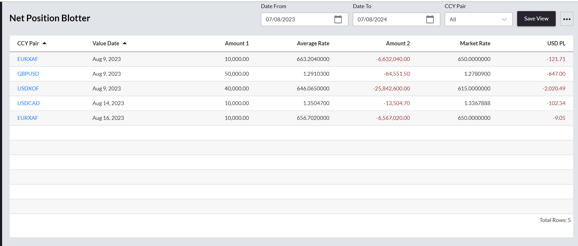
The Net Position Blotter in the Client Portal shows a list of all open FX positions, grouped by currency pair and value date.
For each open position, the table shows the aggregate amounts in each currency, the weighted average rate of all trades that make up the position, the current market rate and the P&L of the position in USD.
Filters are available at the top of the page to view positions within a specified date range or currency pair. Changes made to these filters can be saved by clicking on the Save View button. Clicking on the three dots in the top right of the page allows users to download the contents of the blotter to CSV file.
Maturity Blotter
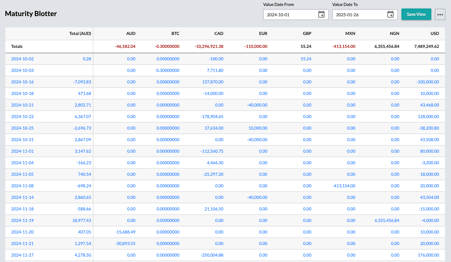
The Maturity Blotter in the Client Portal shows a list of all future currency settlements by value date. For each value date for which a trade is due to settle, the blotter shows the sum of all amounts in each currency due for settlement on that date.
The Total (AUD) column on the far left of the table shows the sum of all currency amounts converted to AUD.
Filters are available at the top of the page to view settlements within a specified date range. Changes made to these filters can be saved by clicking on the Save View button. Clicking on the three dots in the top right of the page allows users to download the contents of the blotter to CSV file.
Trade Blotter
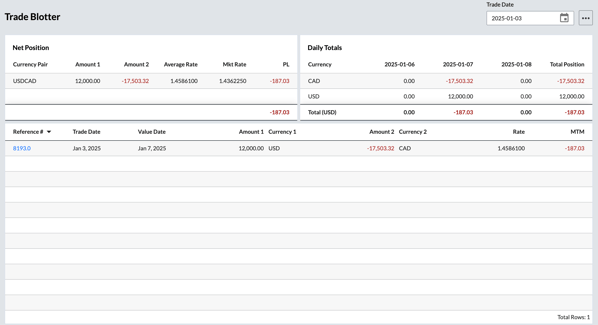
The Trade Blotter in the Client Portal is organized into three distinct cards designed to summarize key trading information: the Net Position Card, the Daily Totals Card, and the Open Trades Card.
Net Position Card
The Net Position card, located in the top-left corner of the blotter, provides a summary of currency pairs traded. It displays the net amounts across all executed trades for each currency pair.
For each traded currency pair, the Net Position card shows the net volume, which represents the following:
-
Net volumes traded in the currency pair.
-
The average rate at which the trades in the currency pair were executed.
-
The current market rate for the currency pair.
-
The unrealized P&L from the net position.
Daily Totals Card
The Daily Totals card in the top-right of the blotter displays the daily total of each currency traded for the past three days. These daily totals are converted into the entity base currency and shown at the bottom of the card.
Open Trades Card
The Open Trades card, located at the bottom of the blotter, provides a detailed summary of all open trades that meet the selected filter criteria. Each trade is displayed as a separate line, showing key details to help you track and manage trading activity.
- Reference Number: Unique identifier for the trade.
- Trade Date: The date the trade was executed.
- Value Date: The settlement date of the trade.
- Currency 1: The primary currency and its trade notional amount.
- Currency 2: The secondary currency and its trade notional amount.
- Rate: The rate at which the trade was executed.
- Mark-to-Market (MTM): Current valuation of the trade.