
Video Overview
Setting Up Spread Rules
To add a new spread rule:
-
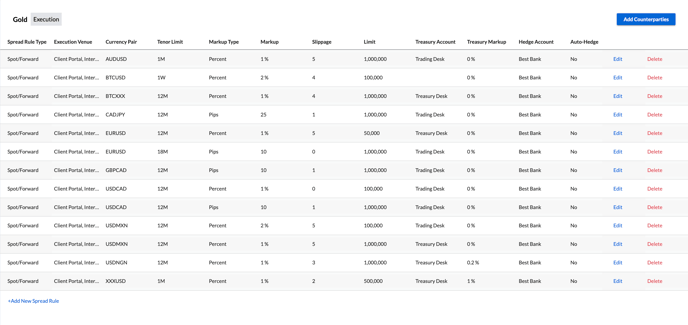
Click on the +Add New Spread Rule button at the bottom of the page
-
Specify:
- Spread Rule Type - Execution spread groups can be either Spot/Forward or Orders
- Execution Venue - The venues where this rule applies, whether transactions are executed through the client portal or internally via trade on behalf
-
Currency Pair - The traded currency pair the spread rule should apply to
-
Tenor Limit - Determines the maturity up to which the spread rule should be applied. In the example below, a 1% markup will be applied to USDCAD trades that have a maturity of up to 12 months, whilst a 2% markup will be applied to USDCAD trades with a maturity of 12 months - 2 years. USDCAD trades with a maturity of greater than 2 years would be routed for Dealer Intervention:

-
Markup Type - Whether the spread should be applied in absolute points or as a percentage of price
-
Markup - The amount of spread to be applied
-
Slippage - The maximum market movement allowed from the shown quote to book the trade, specified in pips. For example, if the slippage is set to 5 points and the market moves more than 5 points between quote and execution, the trade will not be executed.
-
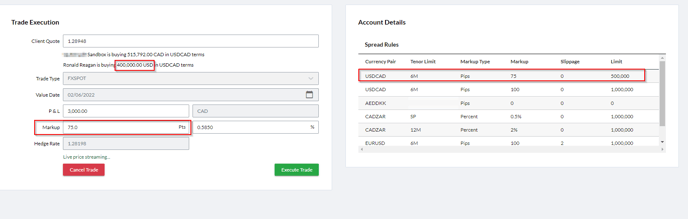
Limit - The maximum notional clients assigned to this Spread Group are able to trade in any single transaction. Multiple limits are supported using similar logic as applied in the Tenor Limits above: when a request comes in over the first limit, the next lowest applicable limit will be used:
-
Treasury Account - The account that the risk associated with any trade executed against this spread rule should be booked into. The trade booked into the specified Treasury Account will be booked at the market rate + Treasury Markup, but will exclude the sales markup defined in the 'Markup' field
-
Treasury Markup - The amount of treasury spread to be applied to the market rate, before any sales spread (markup) is applied
-
Pricing Source - The source of pricing that should be used to price requests that meet the spread rule criteria. This will either be any liquidity providers you have that are connected to Kooltra, or market rates
-
Auto-Hedge - Whether trades executed against this spread rule should be automatically booked back-to-back with your liquidity provider. This option can only be checked if the Hedge Account is set to a liquidity provider (if the Hedge Account is market rates, this option will be greyed out)