
The number of approvals required before a cashflow may be processed, and which users are permitted to approve cashflows, is fully configurable.
How to Approve Cashflows
Approvals can be provided directly on the cashflow ticket or via the Cashflow Export page (if enabled). The number of approvals required before the cashflow may be processed is specified on the cashflow ticket.
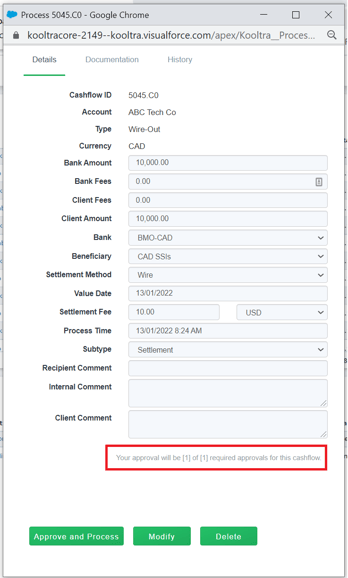
To approve a cashflow from the ticket, load the relevant cashflow and click Approve at the bottom of the page.
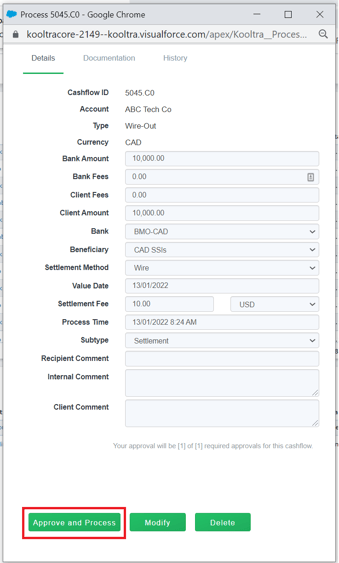
If yours is the final approval required before the cashflow may be processed, the button will read Approve and Process as below:
Configuring Cashflow Approvals
System administrators can set the number of cashflow approvals required from within the Salesforce backend by following the steps below:
-
On the top-right corner of the screen, click on the cog icon and select Setup
-
Within the Quick Find box on the left of the page, search for Custom Metadata Types
-
Click Manage Records next to the item Cashflow Required Approval Setting
-
If no records exist, click 'New', otherwise edit the existing record. Having multiple settings configured is not currently supported.
-
Populate the fields highlighted in red and Click Save.
-
Label - the name you wish to call the setting. The value entered here does not need to be in any particular format
-
Cashflow Required Approval Setting Name - this field will auto-populate based on the value entered in the Label field
-
Entity Id - this should be set to the value orgwide
-
Required Approval Count - the number of approvals required before a cashflow can be processed
-