Overview
Kooltra’s Pre-Trade Credit Check feature determines whether a trade request may be executed based on whether the trade would result in:
-
the client breaching their Margin Requirements
-
the client exceeding their Net Open Position (NOP) Limit
-
the client exceeding their Spot / Forward Limits
The Pre-Trade Credit Check can be configured to consider any or all of these when determining whether a trade may be executed, and can be set at the organisation, profile and user levels.
Configuration
Finding the Settings
To configure the Pre-Trade Credit Check, follow the steps below:
-
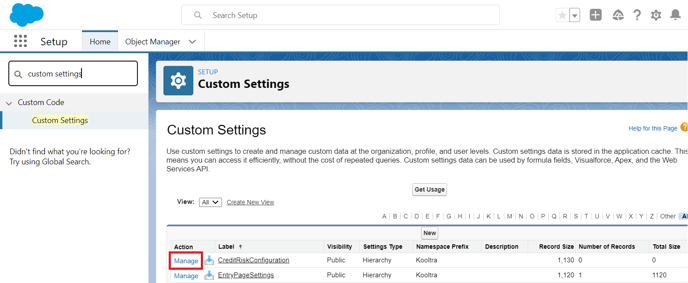
Within the Salesforce backend, go to Setup > Custom Settings
-
Identify the CreditRiskConfiguration custom setting and click "Manage" as below
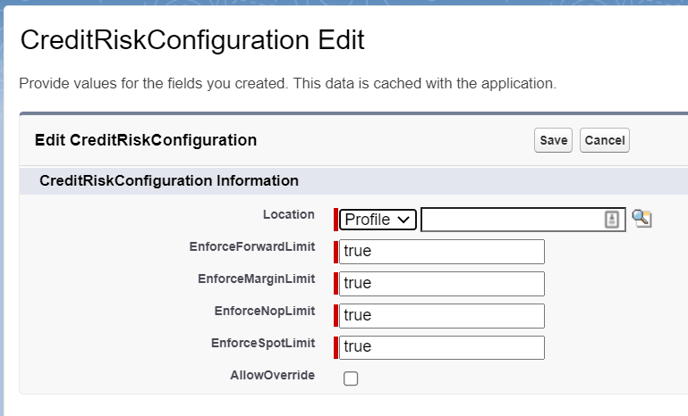
EnforceForwardLimit
The transaction will be rejected if it would make the forward utilization of the account exceed the defined Forward Limit
Valid values: "true" or "false"
EnforceMarginLimit
The transaction will be rejected if it would result in margin excess going negative
Valid values: "true" or "false"
EnforceNOPLimit
The transaction will be rejected if it would make the NOP of the account exceed the NOP Limit
Valid values: "true" or "false"
EnforceSpotLimit
The transaction will be rejected if it would make the spot utilization of the account exceed the Spot Limit
Valid values: "true" or "false"
Allow Override
For users with this setting checked, if the trade fails the pre-trade credit check they will receive a warning modal rather than a rejection message, and can confirm if they still want to proceed
Configuring Organisation-Wide Pre-Trade Credit Check
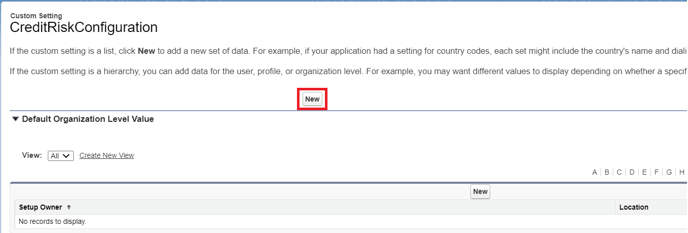
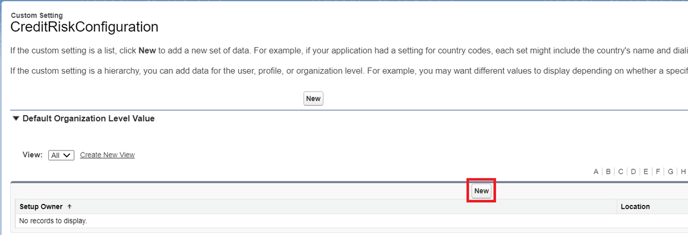
To configure Pre-Trade Credit Check settings for your entire organisation, click ‘New’ above ‘Default Organization Level Value’ on the CreditRiskConfiguration page as below:
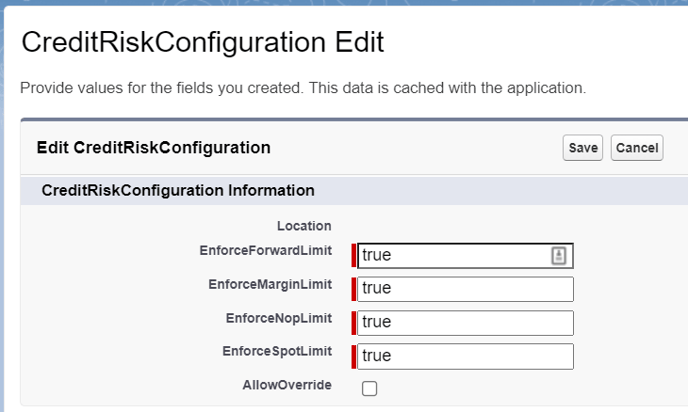
From here, define which limits you wish to enforce and click Save:
Configuring Pre-Trade Credit Checks for Specific Profiles / Users
To configure Pre-Trade Credit Check settings for specific Profiles or Users, click ‘New’ on the CreditRiskConfiguration page as below:
From here:
-
Select Profile or User in the ‘Location’ dropdown as required
-
Search for the profile/user you wish to configure the pre-trade credit check for in the box to the right
-
Define which limits you wish to enforce and click Save: