
In Kooltra, every user is assigned a user profile. Profile Management allows administrators to configure and customize the pages associated with these profiles. This feature ensures that users have access to the necessary pages and settings based on their roles.
To access Profile Management, go to the x-System > Profile Management in the navigation pane. From there, you can manage the pages linked to different user profiles.
Updating a Profile
To update a profile, follow the steps below to modify the pages associated with the profile.
-
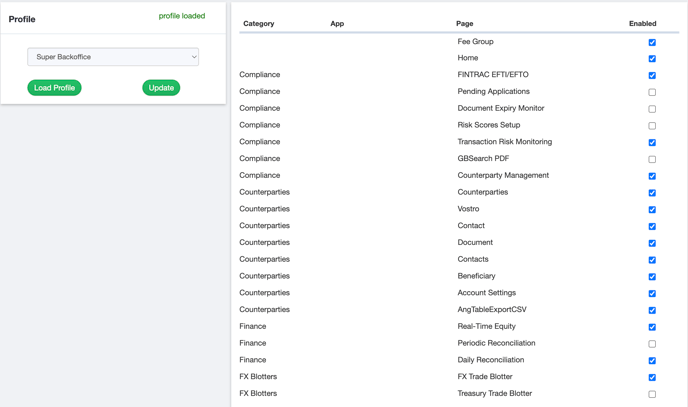
On the Profile Management page, select the profile you wish to update from the dropdown menu and click Load Profile.
-
Once the profile is loaded, you can select or remove the pages the profile has access to by checking or unchecking the box next to each page name.
-
Click the Update button to save your changes.
Updating Individual User Page Access
If you need to provide users who share the same profile with different page access, this can be done through User Management. User Management allows administrators to:
- Update a user's profile assignment
- Adjust the permissions for entities they can access
- Select specific pages within the profile that the user can view
To learn more about how to perform these actions in User Management, refer to the article Understanding User Management.