
What are Spot Limits and Forward Limits?
Spot Limits and Forward Limits in Kooltra define the maximum exposure clients are able to hold in spot and forward positions respectively when they have insufficient margin on account.
When are Spot Limits and Forward Limits applied?
Spot and Forward Limits are considered when a client makes a trade request that would breach their margin limit.
Consider the case where a client requests a Spot trade that would result in a margin deficit. In this case, Kooltra will perform a pre-trade credit check to see if the trade would result in their total spot exposure exceeding the configured Spot Limit.
Kooltra does this by summing the notional amounts of all open Spot positions (converted to the base currency), plus the requested trade notional, and comparing this total amount with the configured Spot Limit:
- If this total exceeds the Spot Limit, the trade request will be rejected as part of the pre-trade credit check
- If this total is below the Spot Limit, the trade will be permitted
Forward Limits behave in the same way when assessing forward trade requests.
If a client makes a trade request for which they have sufficient margin on account, the Spot and Forward Limits will not be considered.
Where are Spot Limits and Forward Limits defined in Kooltra?
Spot Limits and Forward Limits are configured per client and can be seen on the Counterparties page, accessed by going to Counterparties > Counterparties in the navigation panel and then clicking on the relevant Counterparty name.
The currency in which the limits will be evaluated is shown on the right side of this field.
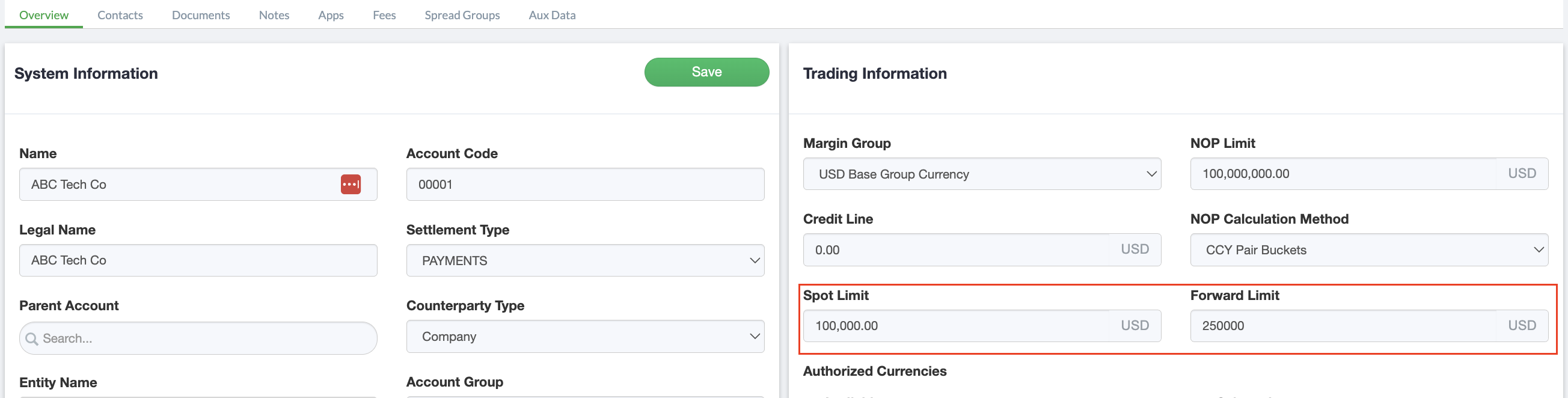
After making any updates to the Spot Limit or Forward Limit for a Counterparty, click Save to commit the changes.