
Statements are handled two ways in Kooltra—automatically and manually.
Automatic Statements
To automatically subscribe an account for statement delivery, navigate to Counterparties > Counterparties in the left navigation panel and use the local search bar to find the counterparty by name. Select the counterparty to open the overview page.

Once selected, go to the Contacts tab in the navigation panel at the top of the page. Choose the contact you want to receive the statements. This will open up the Contact Overview page.

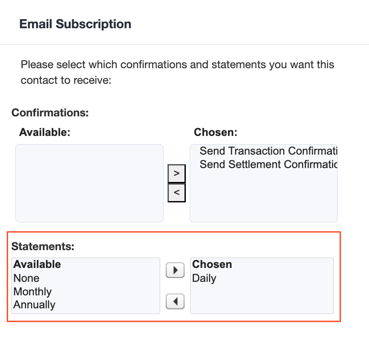
In the Email Subscription card at the bottom of the Contact Overview page, select the desired frequency for statement generation and delivery—Daily, Monthly, or Annually. If "None" is selected, statements will not be emailed.
Manual Statements
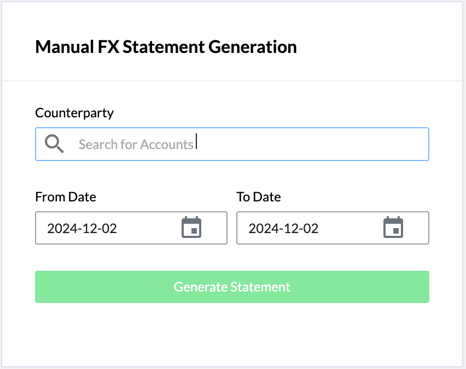
To manually generate a statement, access the FX Statements page, click on Reporting > FX Statements in the navigation panel.
You first need to enter the counterparty name and specify a date range for the statements to be generated for. Once the information is entered, click the Generate Statement button which will open up a downloadable PDF file in a new tab. If the statement is not opening in a new tab, please ensure that the pop-up windows are allowed for Kooltra by disabling pop-up blocker in the Internet Browser settings.
Financial Summary & Overview
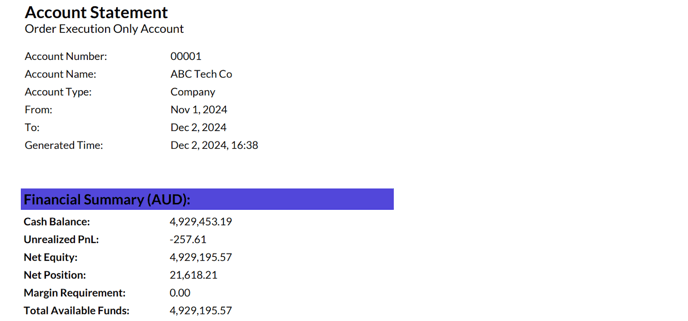
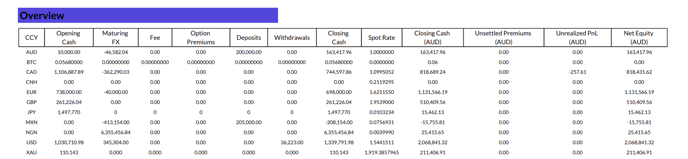
The first page of the statements provides an overview of key financial metrics in the entity's base currency (AUD in this example). These metrics include the cash balance, equity, net position, and margin requirements. Additionally, it includes an overview of cash movements for each of the client's Vostro accounts.
Net Exposure (By Currency)
The Net Exposure (By Currency) section provides an overview of the net balances held by a counterparty for each traded currency, excluding the entity’s base currency, for the specified date range.

Collateral Movements
The Collateral Movements section displays a list of all freeform cashflows during the specified date range of the statement.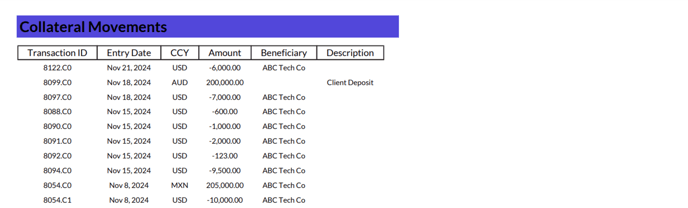
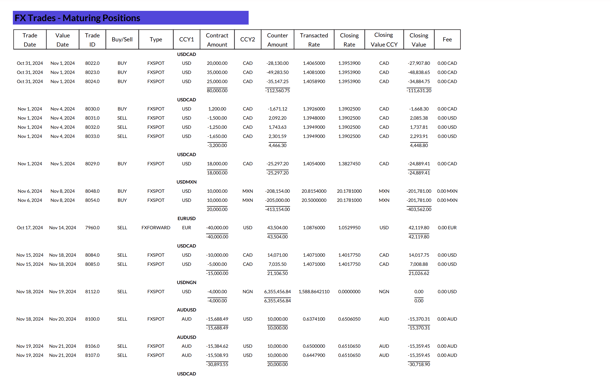
FX Trades - Maturing Positions
The Maturing Position section displays all trades that are either settled or are scheduled to settle within the specified date range of the statement.
FX Trades Dealt
The FX Trades Dealt section displays a list of all trades that were executed during the specified date range of the statement.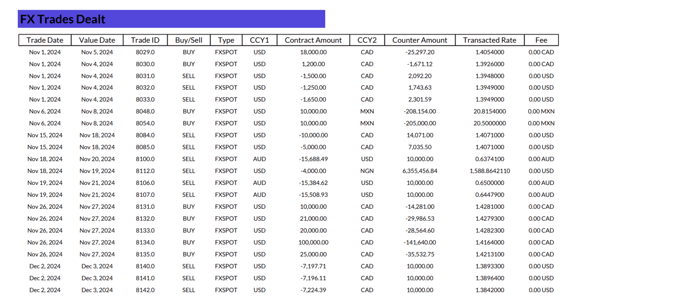
FX Trades - Open Positions
The Open Positions section displays all trades that are open and are not scheduled to settle within the specified date range of the statement.

You can customize the email verbiage and the statement PDF to include or exclude specific sections. For details on configuring the Bulk FX Statement app in your organization, refer to the article: Enabling the Bulk FX Statements App.