
Overview
Kooltra's Funds Available functionality can be configured at two levels:
- User Level - the first level of configuration determines which Funds Available settings should apply to Kooltra users, and can be defined at system, profile and/or user level.
Using this configuration, you could allow a risk user to override funds available checks if a limit is breached, but restrict settlements users to only release funds determined to be available by the credit check, for example. - Account Level - The second level of configuration is at the account level. An example use case we can consider here is where a newer client may have stricter rules enforced than an older trustworthy client.
Finding Funds Available Settings
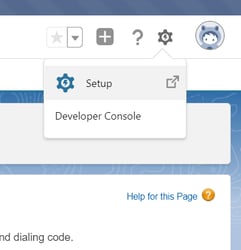
In order to view the currently configured Funds Available settings in the platform, navigate to Setup within your Salesforce Backend by clicking on the cog in the top-right corner of the screen:
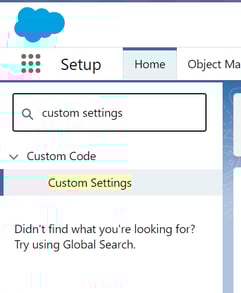
From here, search for Custom Settings within the search bar:
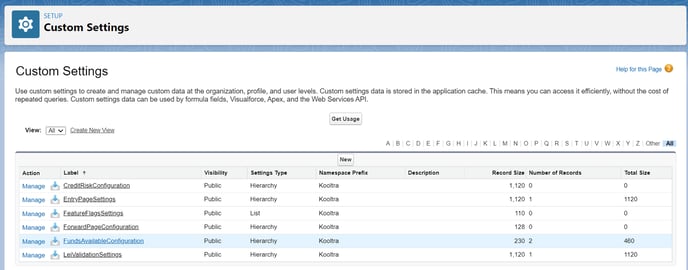
The Funds Available settings can then be viewed by clicking on FundsAvailableConfiguration within Custom Settings.
To edit the Funds Available settings, click Manage as highlighted below:
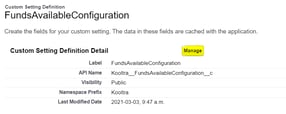
From here, you can edit the existing default settings for the organization, or create a new permission set for specific users or profiles.

User Level Restrictions
AllowOverride
This setting determines whether the user is able to manually override funds available checks.
With the AllowOverride setting checked, users are able to manually book trades and cashflows that would otherwise be blocked by the funds available logic. In this case, users will receive a warning rather than an error and can confirm if they still want to proceed when the funds available check is violated.
With the AllowOverride setting unchecked, users are forced to comply with the configured funds available logic.
The default value for this setting is FALSE (unchecked).
HoldCashForFutureTrades
This setting determines how the funds available calculation considers cashflows attached to trades with a value date in the future.
When the HoldCashForFutureTrades setting is checked, funds received against a future trade are held back and reduced from available funds in the vostro to ensure that the funds continue to be tied to that trade.
When the HoldCashForFutureTrades setting is unchecked, funds received against a future trade are not reduced from available funds in the vostro.
The default value for this setting is TRUE (checked).
IncludeFutureCashflowPayments
This setting determines how the funds available calculation considers payments due against future cashflows.
When the IncludeFutureCashflowPayments setting is checked, available funds are reduced by released, but not settled, payments associated with future cashflows; for example next day ACH / cheque.
When the IncludeFutureCashflowPayments setting is unchecked, available funds will exclude released, but not settled, payments associated with future cashflows.
The default value for this setting is TRUE (checked).
IncludeFutureCashflowReceipts
This setting determines how the funds available calculation considers funds due to be received against future cashflows.
When the IncludeFutureCashflowReceipts setting is checked, available funds are increased by released, but not settled, funds associated with future cashflows; for example next day ACH / cheque.
When the IncludeFutureCashflowReceipts setting is unchecked, available funds will exclude released, but not settled, funds associated with future cashflows.
The default value for this setting is FALSE (unchecked).
IncludeMarginRequiredBase
This setting determines whether the funds available calculation includes any margin required to be held against the account.
With the IncludeMarginRequiredBase setting checked, available funds will be reduced by any margin required to be held against the account.
With the IncludeMarginRequiredBase setting unchecked, available funds will ignore any margin required to be held against the account.
The default value for this setting is TRUE (checked).
IncludePendingPayments
This setting determines whether the funds available calculation includes payments pending against the account.
With the IncludePendingPayments setting checked, available funds will be reduced by any pending payments to be made on the account.
With the IncludePendingPayments setting unchecked, available funds will ignore any pending payments due on the account.
The default value for this setting is FALSE (unchecked).
IncludePendingReceipts
This setting determines whether the funds available calculation includes pending receipts on the account e.g. free-form deposits.
With the IncludePendingReceipts setting checked, available funds will be increased by any pending funds due to be received on the account.
With the IncludePendingReceipts setting unchecked, available funds will ignore any pending funds due to be received on the account.
The default value for this setting is FALSE (unchecked).
IncludeTradesSettlingToday
This setting determines whether the funds available calculation takes into account trades due to be settled today.
With the IncludeTradesSettlingToday setting checked, the available funds calculation will include cashflows associated with trades that settle today.
With the IncludeTradesSettlingToday setting unchecked, the available funds calculation will exclude cashflows associated with trades that settle today.
The default value for this setting is TRUE (checked).
IncludeUnrealizedLoss
This setting determines whether the funds available calculation includes any unrealized losses determined by the system’s mark-to-market valuations of open trades on the account.
With the IncludeUnrealizedLoss setting checked, available funds will be reduced by any unrealized losses associated with trades on the account.
With the IncludeUnrealizedLoss setting unchecked, available funds will ignore any unrealized losses associated with trades on the account.
The default value for this setting is FALSE (unchecked).
IncludeUnrealizedProfit
This setting determines whether the funds available calculation includes any unrealized profits determined by the system’s mark-to-market valuations of open trades on the account.
With the IncludeUnrealizedProfit setting checked, available funds will be increased by any unrealized profits associated with trades on the account.
With the IncludeUnrealizedProfit setting unchecked, available funds will ignore any unrealized profits associated with trades on the account.
The default value for this setting is FALSE (unchecked).
AllowPendingCashflowCreate
This setting determines whether newly created pending cashflows are subjected to funds available checks.
With the AllowPendingCashflowCreate setting checked, pending cashflows can be created without the funds available check being run.
With the AllowPendingCashflowCreate setting unchecked, users will only be permitted to enter pending cashflows if the funds available checks allow.
The default value for this setting is FALSE (unchecked).
EnforcePositiveAccountBalance
This setting determines whether an account is able to go into negative balance.
With the EnforcePositiveAccountBalance setting checked, the system will block the entry of cashflows that would result in either the cash balance on account being reduced below 0, or the funds available being reduced below 0.
With the EnforcePositiveAccountBalance setting unchecked, users will be able to enter cashflows that would result in either the cash balance on accounted being reduced below 0, or the funds available being reduced below 0.
The default value for this setting is TRUE (checked).
Account Level Restrictions
Allow cross-collateralization
This factor allows a particular client the ability to cross collateralize their cash. In other words, if they are sitting on 10m USD, a payment could be released for 1m EUR. The account will still be limited based on the overall cash balance in base currency.
Include Credit Line Cash
By default, a credit line assigned to a client can only be used for margin. With this setting enabled, the client would be able to use that credit for payments/withdrawals.