
The Margin Monitor in Kooltra allows users to review risk and margin information associated with each counterparty.
To access the Margin Monitor, go to FX Blotters > Margin Monitor in the navigation panel.
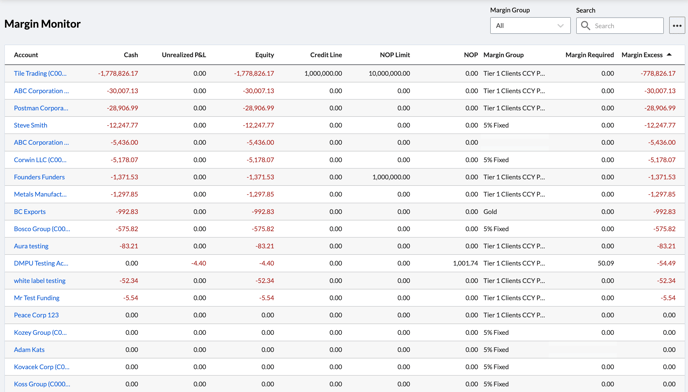
For each Counterparty in the system, this page allows you to view:
- Cash: The net amount of all cash balances held in the account, converted to your base currency.
- Unrealized P&L: Unrealized profit or loss calculated from the mark-to-market valuations of all open positions.
- Equity: Represents the liquidation value of the account, calculated as Cash + Unrealized P&L.
- Credit Line: Any credit provisioned on the account, typically used to supplement initial or variation margining or facilitate settlements for high-value customers. Any Credit Line assigned to an account directly increases or decreases margin excess/deficit.
- NOP Limit: Details the Net Open Position Limit assigned to the account.
- NOP: Net Open Position (NOP) shows the account’s exposure to the market across all open positions, converted into base currency. In Kooltra, there are three options for calculating NOP: Gross, Currency Pair Buckets, and Currency Buckets. NOP calculations do not consider closed trades/positions.
- Margin Group: The margin group that the account has been assigned to.
- Margin Required: Calculated whenever Positions, Cash Balances, or Rates change. Margin Required is calculated at the Account level and is a function of the rules configured for the assigned Margin Group.
- Margin Excess: Equal to Equity + Credit Line - Margin Required.
Sorting & Filtering
It is possible to sort or filter the Margin Monitor table based on any of the columns displayed. Click on a column header to sort the table by the column in question.
In the top right corner of the Margin Monitor is a local search bar that allows you to search on any column. There is also a More button (…) to the right of the search bar that allows you to export the Margin Monitor results as a .csv file for record keeping and processing outside of Kooltra.
To view additional information about an account, you can click on the account name in the Account column.