
With the Dealer Intervention functionality turned on, price requests are routed to Dealer Intervention in one of three scenarios:
- No Spread Rule: There is no defined Spread Rule within the client’s Spread Group that matches the request parameters.
- Credit Limit Breach: The request fails the Pre-Trade Credit Check according to your organization’s configuration.
- LP Connection Unavailable: The system is unable to connect to the liquidity provider responsible for providing a price for the request.
Each of these scenarios is explained in greater detail below.
No Spread Rule
Within the Spread Group a client is assigned to, several Spread Rules will be configured to determine the pricing the client will receive for different currency pairs, tenors, and volumes.
If a client submits a request, either through the Client Portal or via the Trade on Behalf page, for which no associated Spread Rule exists, the request will be routed for Dealer Intervention.
Example
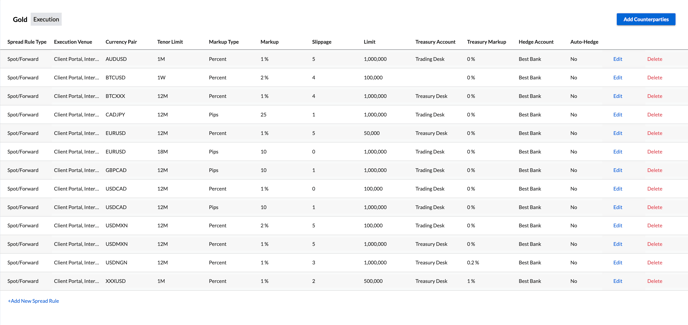
ClientABC is assigned to the Spread Group Gold, which has spread rules as defined below:
Scenario 1
ClientABC logs onto the Client Portal and submits a trade request to buy $10,000 USD against CAD for spot delivery.
Since a Spread Rule has been defined for USDCAD pricing up to 2 years with no notional limit, the system will automatically price this request by applying a 1% markup to the rate received from the LP, and the request will not be routed to Dealer Intervention.
Scenario 2
ClientABC logs onto the Client Portal and submits a trade request to sell £25,000 GBP against USD for spot delivery.
Since no Spread Rule has been defined for GBPUSD within ClientABC’s Spread Group, the request is routed for Dealer Intervention.
Scenario 3
A trader requests a price via the Trade on Behalf page for ClientABC to buy €10,000 EUR against USD for delivery in 2 years.
Since a Spread Rule has only been defined for EURUSD pricing up to 12 months, the request is routed for Dealer Intervention. Note: If a client is not assigned to a Spread Group and a default Spread Group is not defined, all electronic trade requests from that client will be routed to Dealer Intervention.
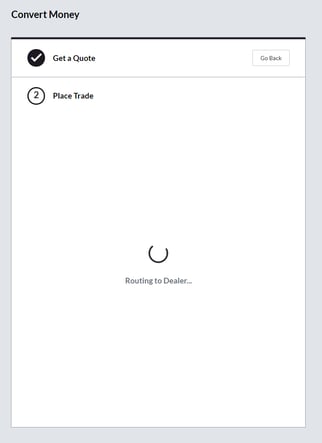
If a trade request is routed for Dealer Intervention, the client making the request will be notified of this in the Client Portal as below.
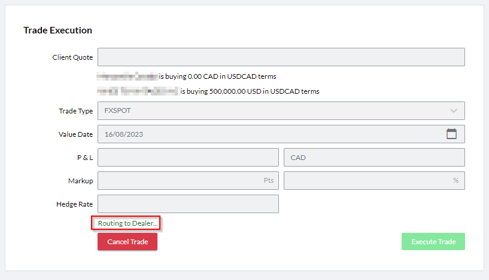
Within the Trade on Behalf page in Kooltra, users are notified of a request being routed for Dealer Intervention as below.
Credit Limit Breach
If a client submits a request either on the Client Portal or via the Trade on Behalf page that would breach the credit rules you have configured in Kooltra, the request will be routed to Dealer Intervention.
Example
Your organization has the EnforceNOPLimit credit setting configured to TRUE, meaning that trade requests which would cause the account to exceed its NOP limit are considered to have failed the Pre-Trade Credit Check.
ClientABC logs has an NOP Limit of $100,000, and a current NOP of $90,000. They log onto the Client Portal and submit a trade request to buy $50,000 USD against CAD for spot delivery.
Since the trade would result in them breaching their NOP Limit, the request is routed for Dealer Intervention with reason Credit Limit Breach.
LP Connection Unavailable
There is an optional setting to route price requests for Dealer Intervention in the event of a liquidity provider outage.
If the feature flag DealerInterventionOnLpOutage is enabled, Kooltra will route requests to Dealer Intervention if the system is unable to connect to your liquidity provider that would be responsible for providing a price for the request.
Request Notifications
Once a trade request has been routed for dealer intervention, authorized users will be notified of the request via a pop-up in the bottom-right corner of the screen, accompanied by a sound notification.

The request can then be opened and responded to by clicking on the Pickup Request button in this notification.
Once a user has picked up the request, any subsequent users who tries to open the request will be presented with a message stating that it is already being handled.

Please Note the Following:
- The pop-up notification shown above only appears on the Dealer Intervention page. If the web browser is not open, or the user is on a page outside of Kooltra, this notification will not be visible until the user navigates to a tab with the Dealer Intervention page open.
- For the sound alert to play, the user must have at least one tab in which the Dealer Intervention page is open. Users will therefore need to keep this page open and be vigilant for the sound notifications in order not to miss pricing requests.
- The sound alert associated with the Dealer Intervention notifications are customizable per user. Please contact Kooltra Support if you wish to change the notification sound from the default setting.